
PUBG Mobile Lag Fix: Settings That Actually Work

· 5 min read

A PUBG Mobile lag fix starts by naming your enemy: a stuttering screen or a spiking ping. They are two different problems, and the fixes point in opposite directions. Frame lag looks like jerky, low-FPS motion even in an empty lobby. Network lag is the rubber-band snap, where you round a rock in Pochinki, take damage from a guy you never saw, and the ms counter in the top corner jumps.
Check the top corner first. PUBG Mobile shows your network delay there, right next to the signal bars. Sitting under 60 ms with green bars means your route is fine and your real issue is frame rate. Bouncing past 150 with red bars means your packets are taking the scenic route to the server.
If it is network lag, most local tweaks won’t touch it. The bottleneck is the path between your phone and the match server, not a slider on your device.
Here is a two-minute test: watch the top-corner ms across a full match. A steady low number with the odd spike is fine. A reading that lives above 120 the whole game, or one that saws between 40 and 200, points at the route. Frame lag behaves differently and stutters even while you stand still in spawn.
The fastest fix for network lag
There is one fix that lowers ping without new hardware: change the road your packets take to the server. LagX does it with smart routing, measuring the paths from your phone to the game server in real time and holding PUBG on the quickest, steadiest one. The tunnel splits per game, so only PUBG rides that road while your messages and downloads stay on the normal connection.
Setup runs in three taps. Pick PUBG Mobile, hit Optimize, and wait for the connect. Our own FPS benchmark, run apart from any PUBG session, climbed from 25-45 FPS with network hitches to a steady 60 once a stable route fed the game.
If your PUBG stutter is really packet loss in disguise, that is where it vanishes. Cut your PUBG ping and watch the top-corner number before you change anything else. Support notes and the current server list live on the PUBG Mobile page.
One caveat up front. If your ms is already low and green, routing won’t help, and you should skip straight to graphics.
Graphics settings that stop frame stutter
For frame lag, the combo that works is Smooth graphics with the Extreme frame rate, because lower render cost is what frees the chip to hit the higher cap. Open Settings, then Graphics, and set Graphics to Smooth. That unlocks the higher frame-rate caps on most phones.
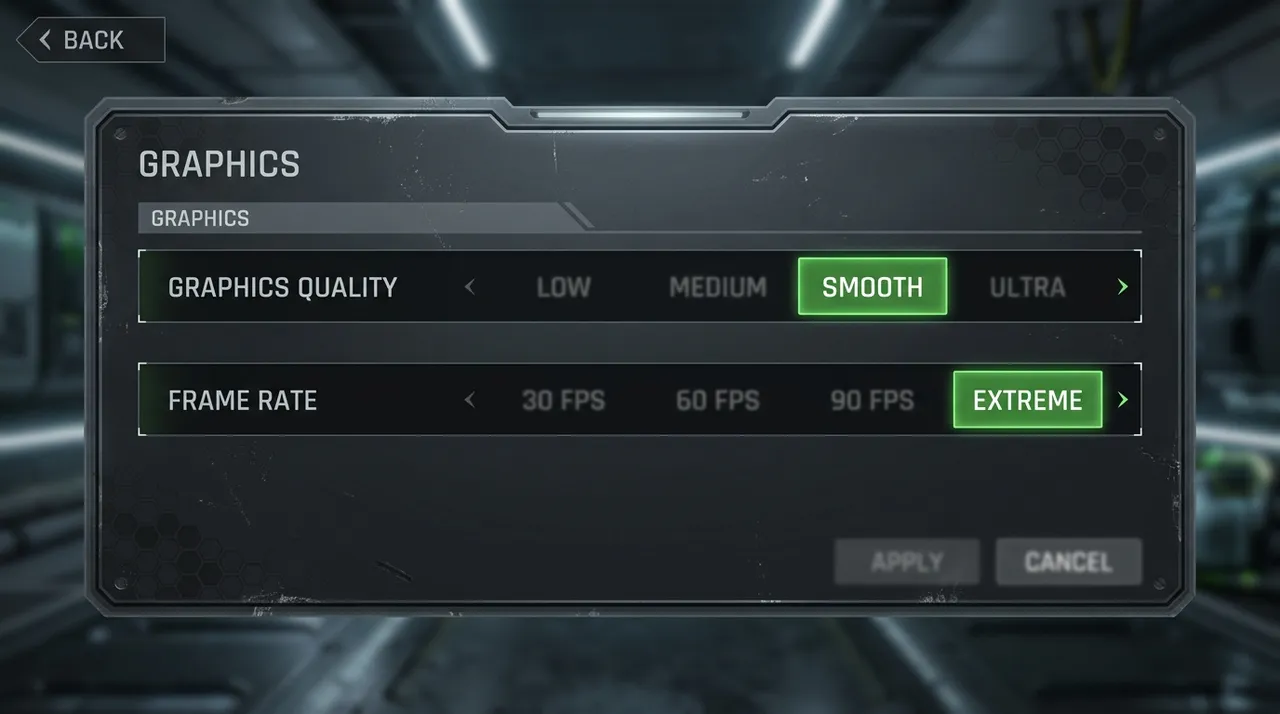
Now set Frame Rate as high as your device allows. Extreme is the common ceiling. Some flagship phones expose a 90 FPS option, and if yours does, it is worth the battery. More frames mean smoother tracking and a real edge in close fights.
Turn off Anti-Aliasing and Shadows in the same menu. They cost frames and hide nothing you need. Style over substance loses gunfights.
Wi-Fi, data, and the boring stuff that works
Play on the 5 GHz band if your router has one. The 2.4 GHz band is slower and crowded with every smart bulb in the house. In your phone’s Wi-Fi settings you will usually see two networks, one ending in “5G”. Use that one.
Sit near the router while you are at it. Wi-Fi loves line of sight, and one wall between you and the box can add jitter that looks exactly like server lag. If ranked matters, play in the same room as the router.
Close background apps before you queue. A video tab or a download eating your bandwidth adds jitter no route can smooth over. Swipe them away, then launch PUBG.
Change your DNS while you are in the Wi-Fi settings. Your phone’s default resolver can be slow to hand back the server’s address, which shows up as a sluggish connect and hitchy matchmaking. Set a public resolver like 1.1.1.1 or 8.8.8.8. It won’t lower your in-match ping, but the handshake gets snappier.
Let PUBG finish its downloads too. The game pulls resource packs after big updates, and a half-done pack stutters mid-match while it streams assets in. Check Settings for a pending download and finish it on Wi-Fi before you touch ranked.
Watch the phone’s temperature. Once the chassis runs hot, the chip throttles itself to cool down, and your FPS tanks mid-match. Take the case off for long sessions. A desk fan is not a joke if you grind ranked.
When nothing works
Sometimes the lag is not yours. If the whole squad rubber-bands in the same match, the game’s own server is having a bad day, and no fix on your end changes that. Wait it out or hop lobbies.
A routing app also can’t rescue trash Wi-Fi. If your signal drops packets before they leave the room, move closer to the router first. Sort the last-meter problem, then worry about the route.
And a phone that is three generations old will cap where it caps. Removing network stutter makes it feel smoother, but it can’t render frames the silicon was never built to produce. Low-RAM phones also swap memory mid-match, which reads as a stutter no route touches, and clearing everything else in the background is the only real lever there.
Most “my PUBG keeps lagging” posts come down to one of those two, rarely both. Settle the ms question first with our ping guide, because chasing graphics sliders when your real problem is a 180 ms route is how people burn a whole evening. If you also grind COD Mobile, the same split applies there.
Your thumbs are probably fine. Your route usually isn’t.


