
GearUP Booster Alternative for Phone-Only Players

· 9 min read

On this page
If a phone is the only thing you game on, the GearUP Booster alternative worth your time is LagX, because a phone is the only thing it has ever had to care about. GearUP is a real optimizer with wide reach: Windows, consoles, its own router, phones. LagX only does phones. That narrowness is the whole argument below.
Credit first. GearUP calls its routing “Adaptive Intelligent Routing” and describes the job on its own homepage in a line most of this industry should copy: “Connection optimization only. No gameplay changes.” It claims 3,000+ games, and its App Store listing carries a 4.0 rating from roughly 9,900 ratings.
That’s not a fly-by-night app, and nothing below pretends otherwise. This is a question about fit.
What both apps are actually doing
Neither of these is a privacy VPN. A privacy VPN exists to hide who you are and pushes everything you do through one server picked for location. A route optimizer exists to shorten and steady the path between your game and its server, which is a different goal with a different shape.
Both apps sit in the second bucket. Both work on the network and leave the game binary alone. Nobody is patching anything.
Both are real. The open question is which one was designed around the device in your hand.
Why players look for a GearUP Booster alternative
Three reasons come up, and each one is readable on a public page you can check yourself. Anything I couldn’t source, I left out.
It’s a four-lane product and mobile is one lane. GearUP’s homepage sells a PC client, described there as a “Game booster for PC platform, also compatible with boosting console games”. On the same page, console coverage runs across PlayStation, Xbox, Switch, Steam Deck and Quest. There’s a mobile app, and there’s also hardware: the HYPEREV Gaming Router at $39.99, down from $99.99, and listed sold out as of Aug 2026.
Breadth like that is a feature if you play everywhere. If your gaming happens on a phone on a bus, you’re following a roadmap that spends most of its time somewhere else. The catalog says the same thing: that 3,000+ counts every platform the company touches, so the number on your home screen is smaller.
On a phone, access is a subscription with a trial that converts. The App Store listing shows a 1-week subscription at $3.49, monthly tiers at $4.49, $7.99, $8.99 and $9.99, and 12-month options at $52.99, $59.99 and $66.99 (as of Aug 2026). On the trial, the same listing says you’re charged on the last day of it. It separately states that subscriptions renew automatically unless you cancel at least 24 hours before the expiration date.
Miss that window on a busy week and the trial becomes a purchase. GearUP discloses both terms on the listing, so this is a diary problem rather than a trick, and diaries lose to a heavy week.
What you pay depends on where you are. Those seven price points are what different storefronts show different people, so “how much is GearUP” has no single answer until you open the app in your own country.
Fair enough as commerce. It does make the thing hard to compare before you’ve handed over a card.
The alternatives, ranked for a phone
I ranked these on four questions. Was it built for a phone or ported to one? Does it change the route your game takes, or only tidy up the device in your hand?
The other two are about money and reach. What does it cost to find out whether it works, and how much of your connection does it take over while it runs? If you’re not sure which number you’re chasing, start with the ping ranges worth aiming at.
1. LagX
LagX picks a route and keeps checking it. Choose your game and it times every way your traffic can reach that game’s servers, then pins the session to the steadiest fast one. It keeps re-timing as the evening shifts around you.
Our recorded Mobile Legends test is the cleanest version of the proof. A match that had been swinging anywhere from 120 to 217 ms settled into a 28-32 ms band once a better path took over, with the same handset on the same network. Nothing moved except the road.
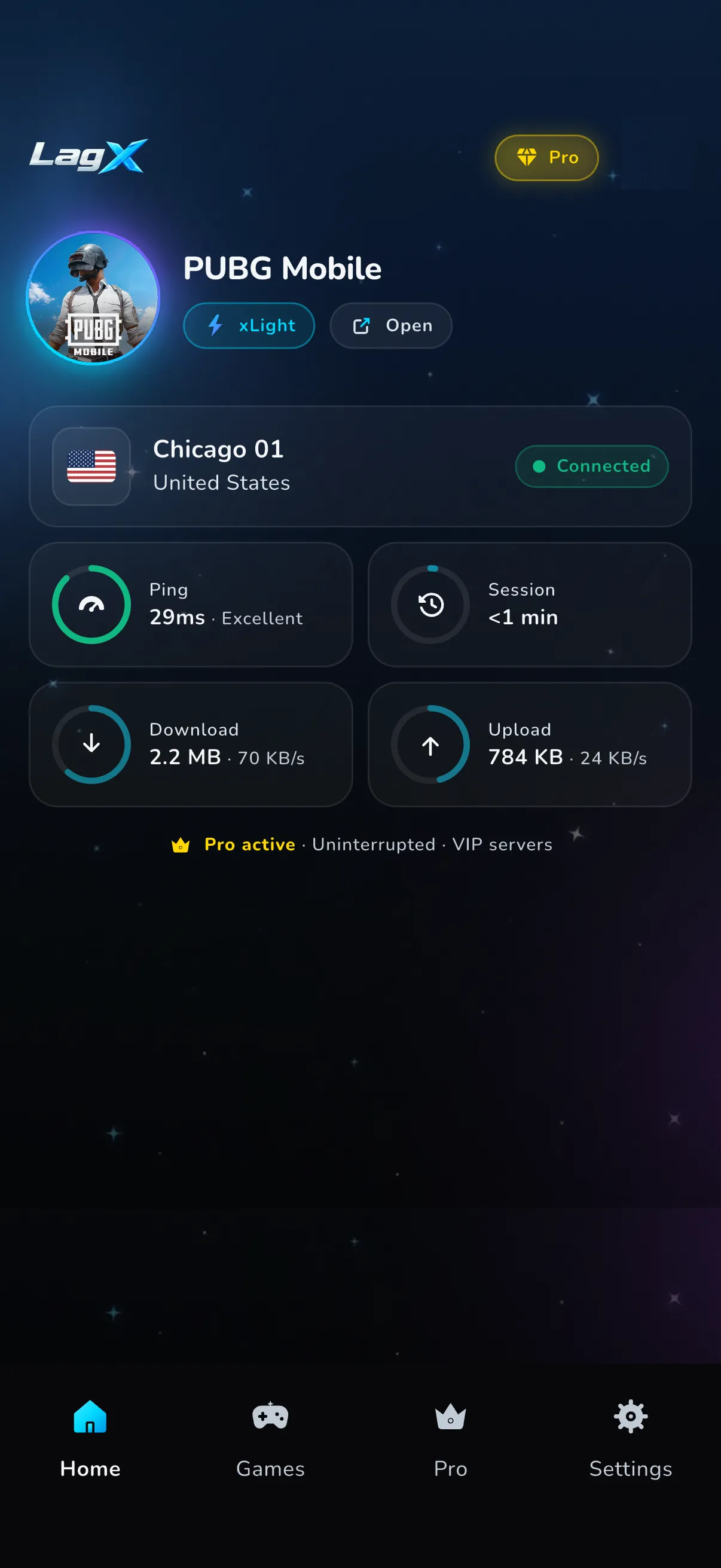
The flow is short. Open the app, pick the game from the list, hit Optimize, and the connection screen fills in while you’re still deciding which mode to queue.
What it brings to the phone case:
- Built for iOS and Android only. There’s no desktop product setting the priorities.
- Split tunnel per game, so only the game you picked rides the optimized route. Everything else on the phone stays on your normal connection, which keeps battery and data overhead down.
- Servers spread over Asia, the Middle East, Europe and the Americas.
- 90+ mobile titles. Roblox, Call of Duty: Mobile, Clash of Clans, PUBG Mobile and Free Fire are all in there, and the full list is on the site.
- Nothing to root or jailbreak. Everything happens on the network side, and the game itself is never patched, injected into or read from memory.
- Free to download, with capped free optimized playtime in most regions before you decide anything. Premium removes the cap.
The limits, said out loud. LagX is mobile-only, so a PC or a console in the same house gets nothing from it, and GearUP genuinely wins that comparison. Free playtime runs on a clock where it’s offered, and unlimited sessions need Premium.
It also can’t beat physics. A weak signal that drops your data before it ever leaves the building is a router problem, and a game server having a rough night is out of everyone’s hands. What you can read in a minute is the connection screen once you’re on, with the route it settled on and the ping it’s holding right there.
On frames, one caveat, because this category oversells it constantly. No routing app adds rendering power to a handset. Our shooter demo had packets going missing and a frame counter lurching through the 25-45 range, then sitting at 60 once the feed arrived intact. Those frames were always there, buried under network stutter.
2. A gaming router, or just fixing your home network
GearUP sells one, and the idea isn’t wrong. A router with sane queue management stops your own household from burying the line you’re playing on, and moving to the 5 GHz band does more for a mobile match than most apps ever will.
Two catches. It only helps at home, which is where phone gaming least often happens, and it does nothing about the path once your traffic leaves the building. A 4K stream in the next room is a problem hardware can solve. A congested route three countries away is not.
Worth doing anyway. It’s the one fix on this page that improves everything else in the house.
3. The game mode already on your handset
Samsung ships Game Booster, Apple ships iOS Game Mode, and most other Android skins have their own version. They hold a steadier performance state and keep notifications out of your match while managing heat. On an aging phone that can be the difference between playable and not.
None of it moves your ping by a millisecond. These tools work on the phone, and ping is made of distance and congestion outside it. Free, already installed, leave it on and expect nothing from it on the network side.
4. A generic VPN
Routing everything through one server chosen for privacy usually adds latency, which is the opposite of the goal. It occasionally helps when an ISP is sending your game down a bad path, but that’s a coin flip rather than a fix.
There’s also the whole-connection problem. A privacy VPN takes your entire phone with it, so your downloads and video calls ride the detour too, which is exactly what a per-game split tunnel exists to avoid.
Keep it for the things it’s good at. Turn it off before ranked.
LagX vs GearUP, side by side
Every GearUP cell comes from its own public pages, as of Aug 2026.
| Feature | LagX | GearUP Booster |
|---|---|---|
| Platforms | Android, iOS | Windows PC, consoles, Android, iOS, plus its own router (source) |
| Built for | Phones only | Everything. PC and console sit at the front of its own homepage |
| Routing | Smart routing per game, re-measured while you play | ”Adaptive Intelligent Routing” over optimized paths (source) |
| Server choice | Automatic, by measured path | You pick a regional server when a game offers several (mobile guide) |
| Traffic scope | Split tunnel: only the selected game is routed | Not stated publicly for the mobile app |
| Price model | Free to download, Premium for unlimited time | Subscriptions from $3.49/week to $66.99/year on iOS (listing, Aug 2026) |
| Free option | Capped free playtime in most regions | Free trial, charged on its last day. Renews automatically unless canceled 24h before expiry (listing) |
| Catalog | 90+ mobile games | 3,000+ games across all platforms (source) |
| Hardware | None | HYPEREV router, $39.99 on sale, sold out as of Aug 2026 (shop) |
| Best for | Players whose only gaming device is a phone | Players covering a PC, a console and a phone at once |
Read the platform row and the free-option row together and the split is plain. GearUP is the wider product with a paid front door on mobile. LagX is the narrow one that starts free in most regions and only ever ships to a phone.
If GearUP isn’t the only name on your shortlist, the ExitLag alternative comparison covers the other big desktop-first optimizer on the same terms.
Three things to check before you pay for either one
Whichever way you go, the test only means something if you run it where you actually play.
Check the network first. A tool that shines on your home Wi-Fi can read very differently on cellular, and if most of your matches happen on data, that’s the only test worth trusting. Run it on the connection you lose games on.
Check the hour. Ping climbs in the evening because everyone else is home, so a Tuesday-lunchtime reading flatters every product on this page. Compare like for like or don’t bother comparing.
Check your game is really covered. A big catalog number counts titles across every platform a company supports, and the only figure that matters to you is whether the game you open tonight is on the list. Both apps let you search before you spend anything.
Test the swap in one evening
Switching costs almost nothing on a phone. There’s no desktop installer to run and no settings to carry over.
Play three matches on your usual setup and write the ping down. Install LagX, pick the same game, tap Optimize, and play three more at the same hour on the same network. Same time of day matters more than people think, because evening congestion is real and it moves the number on its own.
Whichever one puts a lower, flatter ping on the screen wins, and you’ll know inside an hour. If you want that walked through on one title before you start, our Free Fire lag guide runs the whole loop from first tap to final reading.

